LS Central Packages
Can you update existing LS Central installations with Update Service?
Yes, but Update Service can't directly upgrade your existing manual installations, you must re-install the application platform (service-tier/NST, web-client, DLL's) with Update Service, but instead of creating a new database, you connect to your existing database. Then you retire the old service-tier and web-client.
For further directions, see here.
Can multiple installations of Business Central interfere with each other?
No, everything is installed in an isolated location, such as the application assemblies, add-ins, apps, and databases. With the exception that the dependencies required by Business Central are shared by all the instances.
In most cases, there is no problem with that. Even running different major versions of Business Central. The only known issue is when upgrading Business Central from 10.0 to 11.0, where a new version of Microsoft Report Builder introduced in 11.0 was not compatible with 10.0 or earlier versions.
Why isn't LS Central / Business Central installed in the default location?
With Update Service, you can install multiple instances of Business Central on the same machine that do not interfere with each other and possibly with different major or minor versions.
The setup is also fragile to any changes made from external changes, such as from a user or other programs.
This requires Update Service to be in complete control to reduce any mishaps or unintended consequences.
Where is LS Central / Business Central installed?
LS Central is installed as an instance. By default, instance packages are installed at C:\Program Files\LS Retail\Update Service\Instances\INSTANCE-NAME.
What's the difference between the packages bc-server and bc-server-base
The bc-server package installs a new service tier on the machine and you can install it multiple times, creating a new service tier each time (which is not the case with bc-server-base). When you install bc-server, it will also install bc-server-base, if it hasn't been installed already. While bc-server-base installs the BC server application and all the required dependencies (from the DVD).
How to determine what BC version was released with specific LS Central release?
One way is to look at the release notes for the target LS Central version.
We also have a metadata package called map/ls-central-to-bc which you can query the information from.
You must adjust the version (16.2) for map/ls-central-to-bc and set your target LS Central release.
Import-Module UpdateService

$Packages = @(
    @{ Id = 'bc-base-application'; Version = "" }
    @{ Id = 'map/ls-central-to-bc'; Version = "16.2" }
)

$Packages | Get-UscUpdates
When you run the script, you will get a result similar to this:
Id                    Version          InstanceName   Selected
--                    -------          ------------   --------
bc-server             16.0.14073.14195 gyrater-usulus    False
bc-system-symbols     16.0.14073.14195 gyrater-usulus     True
bc-system-application 16.2.13509.13779 gyrater-usulus    False
bc-base-application   16.2.13509.13779 gyrater-usulus     True
map/ls-central-to-bc  16.2.0           gyrater-usulus     True
Where
- bc-server is the platform version.
- bc-base-application is the app version (cumulative update)
How to determine what BC platform version was released with a specific cumulative update?
Similar to the method above, you can use map/bc-app-to-platform to query the platform version, based on the app version. Specify the version cumulative update version or the app version:
Import-Module UpdateService

$Packages = @(

    @{ Id = 'bc-base-application'; Version = "" }
    @{ Id = 'map/bc-app-to-platform'; Version = "16.2" }
)

$Packages | Get-UscUpdates
Which results in:
Id                     Version          InstanceName    Selected
--                     -------          ------------    --------
bc-server              16.0.13440.13772 nigible-ulotcro    False
bc-system-symbols      16.0.13440.13772 nigible-ulotcro    False
bc-system-application  16.4.14693.15445 nigible-ulotcro    False
bc-base-application    16.4.14693.15445 nigible-ulotcro     True
map/bc-app-to-platform 16.2.13509.13779 nigible-ulotcro     True
Where the version selected for bc-server package is the platform version and the version for bc-base-application will be the app version (cumulative update version).
What localizations are available?
There are a handful of localizations available and the list is growing, it is best to view the localization list directly on our public servers.
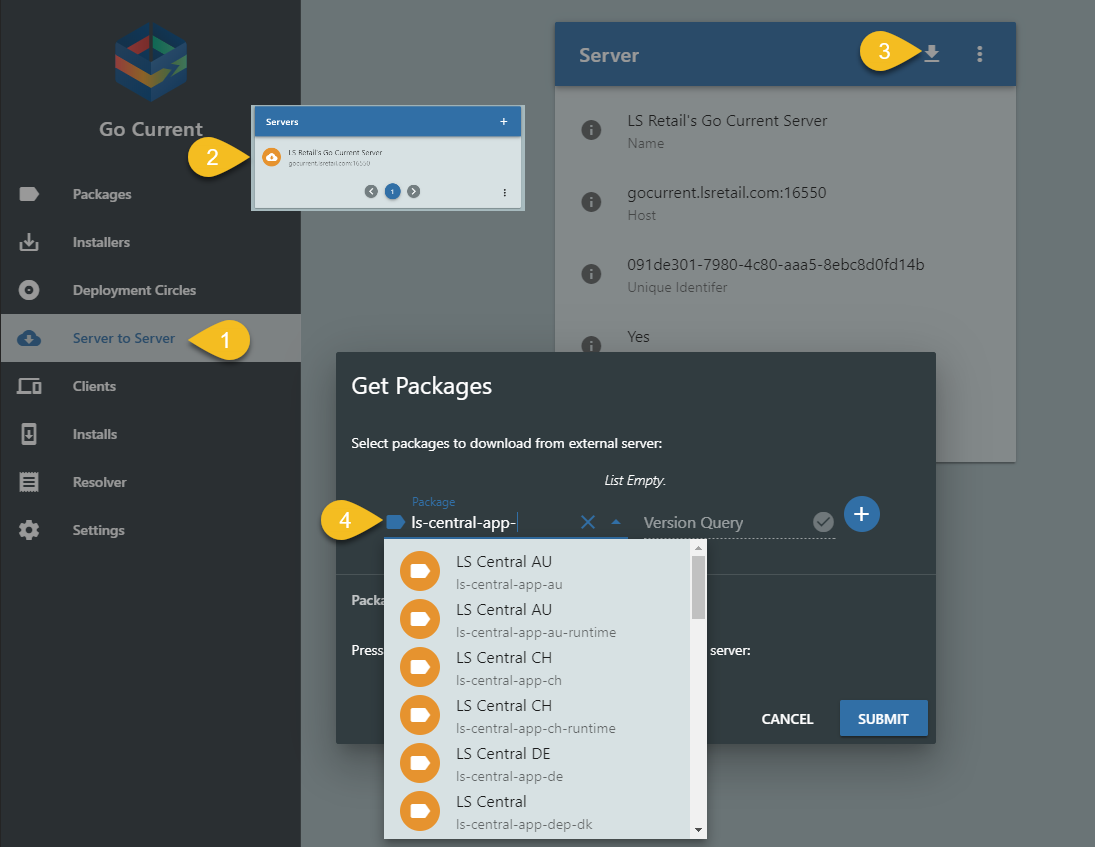
On your Update Service server management portal:
- Open Server to Server
- Select LS Retail's Update Service Server.
- Click the download symbol in the right corner
- Type in "ls-central-app-" into the Package field
- An you will get a list of all the localization available on the server
How can I replicate objects?
Update Service does not perform data replication like Data Director. It is based on packages (PowerShell scripts and installation files).
To install or update objects in a database, you must create an objects package and include it in a bundle package.